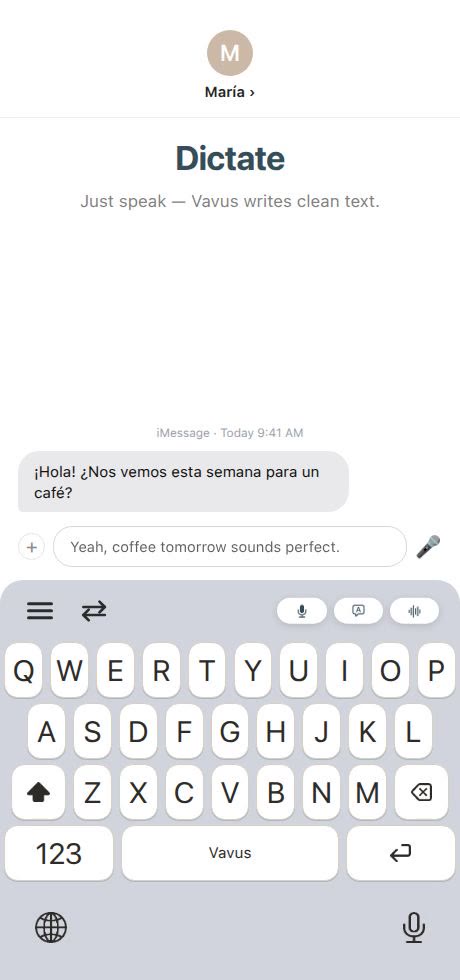
Students and bilingual families do not experience translation as a special project. It shows up in everyday messages: school announcements, teacher emails, homework notes, group chats, family logistics, club updates, apartment messages, job applications, and travel forms.
That is why a keyboard workflow is useful. Vavus Keyboard brings dictation, translation, reverse translation, and history closer to the apps where students and families already write.
School communication is full of small language tasks
A family may need to understand a teacher's message, reply to the school office, ask about an absence, confirm a field trip, or explain a schedule change. A student may need to take notes, ask a classmate a question, or write a draft in a second language.
These tasks are not always complex, but they are constant. Copying text between apps turns simple communication into a chore.
Practical student use cases
Vavus Keyboard can help with:
-Dictating notes after class
-Translating a quick message to a teacher or classmate
-Reverse translating a draft written in the student's strongest language
-Understanding short instructions
-Preparing a study note in another language
-Writing polite emails from a phone
-Translating group chat messages
For school assignments, students still need to follow their school's AI and academic integrity rules. A translation keyboard should help communication and learning, not hide work or replace required practice.
Practical family use cases
Bilingual households often coordinate across languages all day:
-Medical appointment reminders
-School office messages
-Landlord or maintenance notes
-Delivery instructions
-Family group chats
-Travel details
-Local service requests
The keyboard is valuable because those messages happen inside WhatsApp, iMessage, Gmail, SMS, forms, and portals. The language tool should be where the message is.
Dictation helps when mobile typing is the bottleneck
Mobile typing is slow, especially for longer messages or for users who are less comfortable typing in a second language. Dictation lets the user say the thought first, then translate and edit before sending.
This matters for parents, grandparents, students, caregivers, and anyone who understands what they want to say but struggles to type it quickly.
How Vavus fits
Vavus Keyboard is the fast daily writing surface. Vavus AI adds live translation, calls, messaging, documents, files, history, and AI chat when the task becomes bigger than a single message. A student might use the keyboard for a quick class reply and Vavus AI for a longer document or saved translation history.
FAQ
Is Vavus Keyboard only for language learners?
No. It is also for families and students who already live across languages and need faster daily communication.
Should students use it for homework?
Students should follow their school's rules. It can help with language understanding and drafts, but it should not be used to bypass required work.
Why is history useful?
Families and students often reuse the same addresses, school names, appointment details, and phrases. History reduces repeated translation work.