Your website
Add a short code snippet so visitors can chat or start a voice call in their browser.
Vavus Concierge
Concierge answers your customers by chat or phone, using what you tell it about your business. It can check orders and book appointments, and passes customers to your team when they need a person.
Try the demo without signing up.
Try a conversation with the Vavus support agent.
1
Code snippet to add to your website
80
Supported languages
6
Ways to connect with customers
24/7
Answers any time, day or night
Live demo
This is our own Concierge, answering questions about Vavus. Yours would answer about your business in exactly the same way.
Ask about pricing, translation, or setting up the keyboard. You can try the demo in your browser or call the number above.
Your agent gets its own web page. Send the link in a message, put it on your social profile, or print a QR code. You don't need a website.
vavusai.com/a/vavusScan to open the demo. Your microphone is used only with your permission.
Your business information
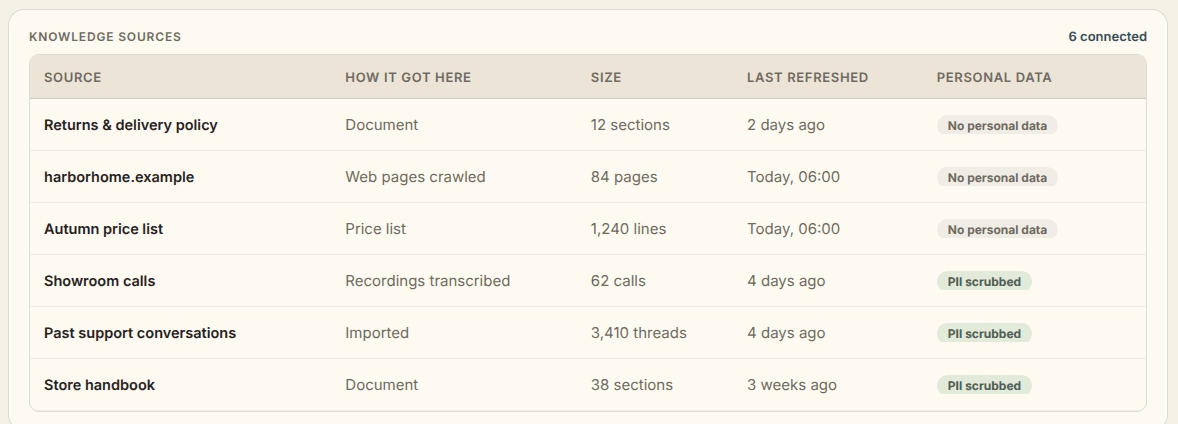
Add your policies, product details and prices. Concierge answers from them, and when something isn't there, it takes a message instead of guessing.
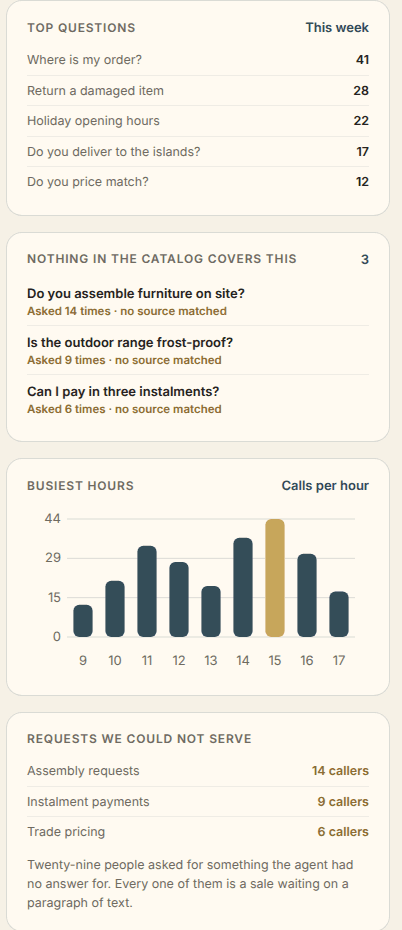
It shows you the questions it couldn't answer, so you can fill the gaps.
Ways to connect
Use the same business information and support rules across your website, phone, and messaging accounts.
Add a short code snippet so visitors can chat or start a voice call in their browser.
Give customers a direct link or QR code to reach your agent, with or without a website.
Answer calls on a Vavus number, your Twilio number or a compatible business phone system, and pass them to your team when needed. Contact us and we'll help you connect it.
Connect your WhatsApp, Telegram, or SMS accounts to answer customer messages.
Reply to customer emails using the same information and tone as your chat agent.
Your developer can connect Concierge to your existing applications through an API.
Use a phone number from Vavus, or bring your own.
Orders and appointments
Connect the tools your business uses so Concierge can check an order, book an appointment, or send a payment link during the conversation.
Look up order details in your connected system and share them with the customer.
Make a booking in your connected calendar during the conversation.
Let customers pay through a link from your connected payment service.
Collect the question and contact details so your team can follow up.
You choose which tools to connect and which actions the agent can take.
Support from your team
Concierge passes the customer to your team, or takes a message, when:
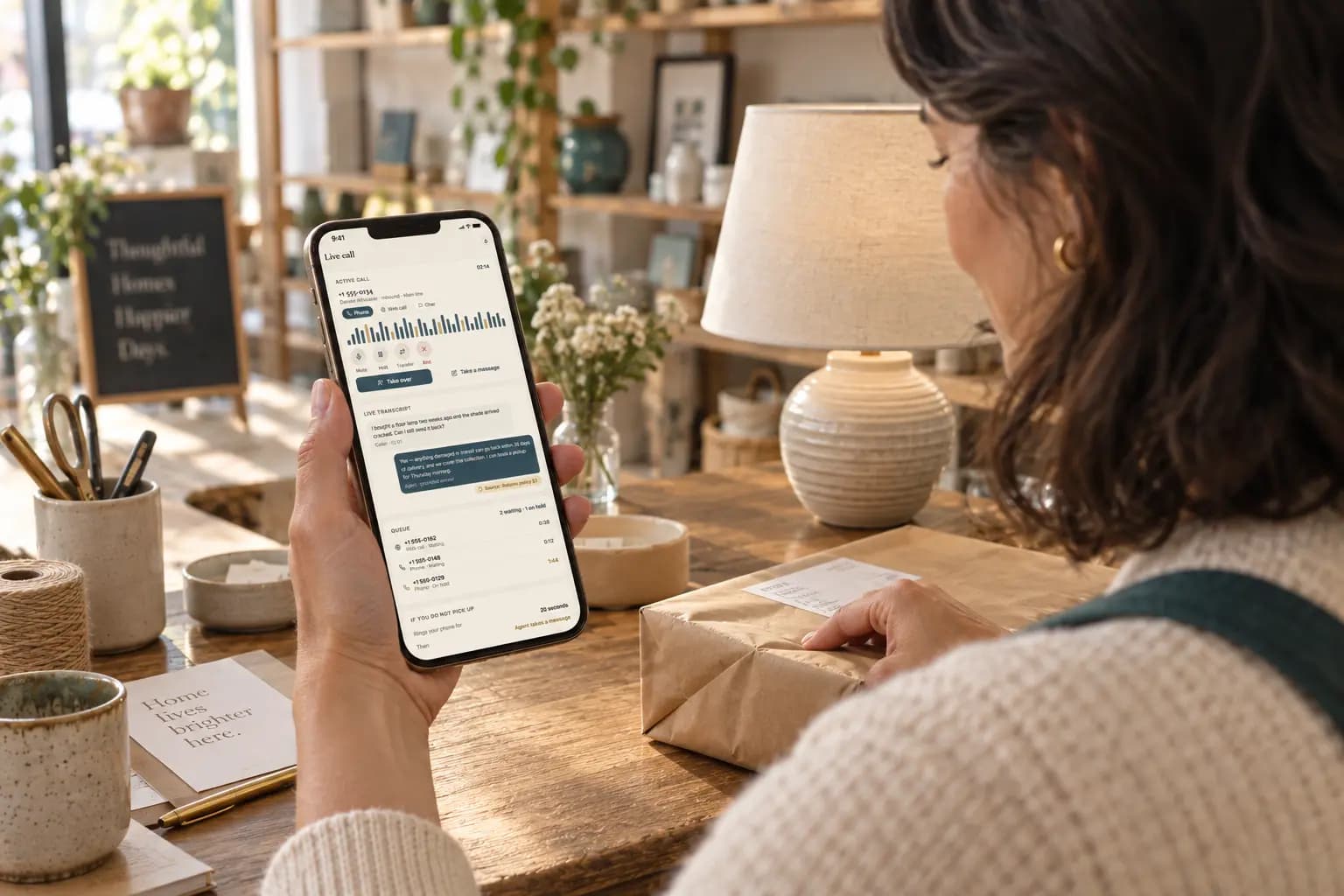
A team member can join the conversation from the dashboard. The customer stays in the same chat window.
Pass the call to your team with the details already collected, so they have the context to help.
When no one is available, collect the request and contact details for your team to review.
Getting started
Answer questions about your services, customers, and how you want the agent to help.
Upload documents or connect your website, price lists, and past support conversations.
Review test conversations and approve the agent before making it available to customers.
Add the agent to your website, share its link, or connect a phone or messaging service.
Languages
Choose which languages your agent uses, and which one it starts in.
Customers can switch languages during a conversation without starting again.
Concierge uses the language technology behind Vavus translation products.
Supported languages include
English
English
Español
Spanish
Français
French
Deutsch
German
Italiano
Italian
Português
Portuguese
Română
Romanian
العربية
Arabic
Customer insights
Review common questions, gaps in your business information, and requests that need a follow-up.
Conversation review
Use the dashboard to listen to live calls, read saved transcripts, and review recordings when recording is enabled.
Follow a call without interrupting it, and join when your help is needed.
Search saved conversations and review the sources used for answers.
Enable recording in your settings. Callers hear a notice before recording starts.
Review the quality score and token usage for each conversation.
Privacy and control
Keep business information in a separate workspace, review imported material, and choose how long to keep conversations.
Beta pricing — 30% off every Concierge plan: $34.98/month (normally $49.97), $349.79/year (normally $499.70), $697.90 lifetime (normally $997). Includes chat and voice, with 50,000 tokens in the first month and 15,000 each month after. Remove Vavus branding for an additional $20 per month.
Beta price — 30% off for the life of the plan.
Use your Vavus account, or create an account and confirm your email address.
Start on Basic, with no card needed. Set up your agent and test it now, and subscribe when you want to take it live.
Monthly, yearly (17% discount), or lifetime — subscribe from the Billing page when you are ready. Cancel subscriptions at any time.
Questions
Concierge uses the business information you provide, such as documents, web pages, and price lists. It is designed to take a message when that information does not cover a question. You can review saved conversations and see which sources were used.
Concierge can transfer the conversation to your team or take a message with the customer’s request and contact details. You set the rules for situations such as repeated questions, missing information, or an unavailable tool.
No. The setup assistant inside Concierge does the work for you. It asks about your business, adds your information and sets up your agent. It can also help you add it where you want it, like your website, a phone number or WhatsApp. To put the chat on your website, you paste one short piece of code.
Your information is kept in a separate workspace. Matching personal details are masked in imported customer material before it becomes searchable, and you review the sources before they are used. Technical diagnostic logs do not include conversation content. Healthcare deployments have a signed Business Associate Agreement (BAA), and your agreement specifies the data processing location.
Concierge can send a payment link through a payment service you connect. It can also look up orders and book appointments when the relevant tools are connected. You control which actions it can take.
Concierge supports 80 languages for on-screen controls and spoken responses. Choose the languages to offer. Customers can switch languages during a conversation without starting again.
Yes. You can listen to live calls from the dashboard and review saved transcripts, answer sources, and quality scores. If you enable recording, callers hear a notice before recording starts. Saved conversations follow your retention settings.
$34.98 a month per workspace (normally $49.97), including 50,000 tokens in the first month and 15,000 each month after. The beta price stays as long as you stay subscribed. Tokens cover conversation usage. Included tokens belong to the workspace and are separate from your personal balance. Phone number rental and carrier call minutes use additional tokens. Removing the “Powered by Vavus AI” label costs an additional $20 per month.
You can try the live demo without signing up. Then use your welcome tokens to build your agent and test it. To make it live for your customers, you need a subscription. You don't need a card to start.
Try the live demo, then set up an agent with your business information.
Try the demo without signing up.
We use first-party cookies and local storage to run this site. You choose which categories to allow. Strictly necessary cookies are always active. See our Privacy Policy for details.