You are in a landlord's office with a lease in your hands, and clause 14 is the one that matters — something about renewal terms, or who pays for what — and you cannot quite work it out. Or a school sends home a dense notice about a schedule change, due back signed by Friday. Or you are at the pharmacy counter with a medicine box, trying to work out how many times a day and with or without food. Or you are on vacation in front of a chalkboard menu scrawled in a language you never studied, and the waiter is waiting.
None of these are emergencies. That is exactly why they are easy to put off — probably fine, ask someone later, deal with it tomorrow. But paper (and paper-like problems: a photographed form, a screenshot, a label) shows up constantly, and most people do not know there is a fast way through it.
Two different jobs here, and two different tools.
Job one: point your camera at it
If it is a sign, a menu, a label, or a single page — something you can photograph in one frame — this is the fast path. In Vavus AI, it is Image OCR Translation: open it from the Translate hub, and point your camera at the text or upload a photo or screenshot you already have.
-Snap it: the app reads the text out of the picture (OCR — optical character recognition — pulling text out of an image) and detects the language.
-Get translated text back: right next to what it found, so you can see both the original and the translation.
-Copy, save, or act on it: reply to the message, note the dosage, decide on the menu item.
This is the right tool for a street sign, a menu, a product label, a flyer, or a screenshot someone sent you — one frame, read and translated on the spot.
Job two: when it is a real document
A lease is not one frame. Neither is a contract, a multi-page form, or a letter with a letterhead and a signature block where the layout carries meaning. Photographing five separate pages and translating each one loses the thing that makes a document a document — the structure that tells you which paragraph belongs to which clause, which line is a total versus a subtotal.
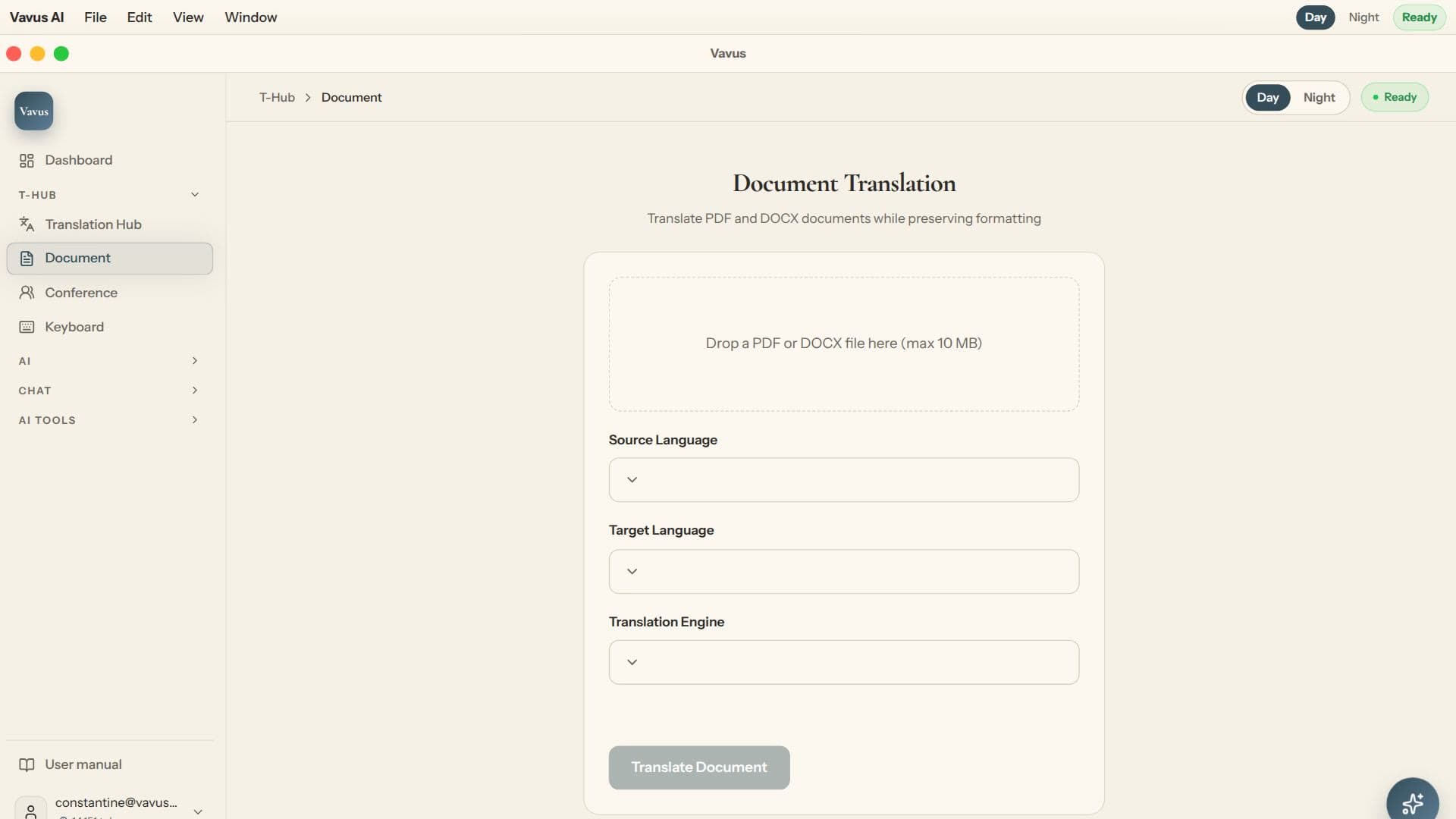
That is what Document Translation is for. Upload the file — a PDF, a Word document, a scanned contract, a medical intake form — and it comes back fully translated with the original layout intact, so a contract still reads like a contract and a form still lines up. Download it, save it, or hand it to the AI tools to summarize before you read the whole thing.
In one line: photo translation gives you the words on a page; document translation gives you back the page.
What to double-check afterward, honestly
Machine translation is good, and it is still worth a second look before you act on the result — especially anything OCR-derived, meaning text pulled out of a photo or scan rather than typed text. A blurry photo or cramped handwriting can trip up character recognition in ways plain typed text never does.
-Sanity-check every number: — a dose, a rent amount, a due date. A misread digit is the most common way this goes wrong.
-Double-check names and proper nouns: — a street name, a medication name — the words most likely to get slightly wrong, since there is no context clue to correct a misread character.
-Reread dates in full: , especially anywhere day/month order could flip the meaning.
-If something looks off, it probably is: — compare the translation against the original line by line.
That is not a knock on the tool. It is the habit worth keeping for any translation, human or machine, when details matter.
The honesty note this whole post is really about
Here is the part that matters most: translation is not the same thing as a certified translation.
If a document has legal or official weight — immigration paperwork, a court filing, a birth or marriage certificate, anything a university, embassy, or government office specifically requires as a "certified translation" — you need a certified human translator, full stop. That is not a disclaimer tacked on to cover ourselves; it is the honest, practical answer. A certified translation comes with a signed statement of accuracy from a qualified translator, sometimes a notarization — the institution reviewing your paperwork checks for that specific credential, not for whether the translation merely reads correctly. A tool like this is excellent for understanding what a document says before you bring it to a professional. It is not a substitute for that professional once the paperwork itself needs to be certifiable.
Not sure whether your situation needs a certified translation? Ask the institution requesting the document — that is the actual authority here, not this app. If they say yes, get a certified human translator for the official copy, and use Vavus AI to understand the document yourself in the meantime.
Privacy, in one sentence
Documents and photos you translate are handled with client-side encryption where applicable, so you are not putting your lease or your medical form through a black box.
What it costs
Vavus AI starts at $9.97/month on web ($9.99 on Apple), or pay-as-you-go with tokens. Photo translation and document translation both run under the same account, with no separate app for the paper stuff.
Frequently asked questions
How do I translate a photo of text?
Open Image OCR Translation in Vavus AI, point your camera at the text or upload a photo or screenshot, and it reads the text out of the picture and translates it on the spot. Works for signs, menus, labels, and single printed pages.
How is document translation different from photo translation?
Photo translation is built for one frame and gives you back the translated words. Document translation handles multi-page files like PDFs, Word documents, and scanned contracts, and preserves the original layout, so a form still lines up and a contract still reads like a contract.
Is this a certified translation?
No. This tool is for understanding what a document says, not for producing a legally certifiable translated document. For anything with legal or official weight, such as immigration paperwork, court documents, or a translation an institution specifically requires to be certified, you need a certified human translator.
What should I double-check after translating a document or photo?
Numbers, dates, and names — especially anything pulled from a photo or scan rather than typed text, since OCR can occasionally misread a character. Compare the translation against the original for anything that actually matters.
The bottom line: paper still shows up everywhere, and most of it needs the right tool, not an app that only handles one sentence at a time. Snap a photo for a sign, menu, or single page. Upload the file when it is a real multi-page document. Double-check the numbers and names either way. And when the paperwork itself needs to be certified, bring in a certified human translator — this tool gets you to understanding what it says, which is most of what people actually need, most of the time. Try it at vavusai.com.