VAVUS

Vavus Concierge

It answers your customers. It never invents your policy.

A customer-service agent on your website and in your chat — and on your phone line, if you want one — that answers only from what your business actually knows, and says “I don’t know” instead of making something up.

No form first. The agent on this page is the product.

Our own agent, answering about Vavus, the way yours will answer about you.

1

Script tag to put it on your site

80

Languages, switchable mid-conversation

6

Ways your customers can reach it

0

Answers from outside your own sources

Live proof

You are talking to it right now.

The bubble in the corner of this page is a Vavus Concierge agent. Ours. It answers Vavus customers from Vavus documents, and it runs no special version of the product.

Ask it what a token is. Ask it how to turn the keyboard on. Then ask it something we have never written down, and watch it tell you it does not know.

Tenant #1 is us. The agent answering on this page is the same product you would install.

No website? It still has a home.

Every agent gets a page of its own. Send the link in a message, put it in a bio, or print the code and stick it on the door — a scan opens the same call.

vavusai.com/a/vavus
QR code that opens a voice call with the Vavus agent at vavusai.com/a/vavus

Point a camera at it. It opens the call, and asks the person holding the phone before it listens.

Grounded answers

It answers only from what you give it.

When no source covers the question, it says so and takes a message. It does not improvise a refund window, invent a delivery date, or quote a price that is not on your list.

A wrong answer costs you a customer. A missing answer costs you a paragraph of text — and the agent tells you which paragraph to write.

Your documents
Policies, handbooks, manuals, terms — whatever the answer actually lives in.
Your website
Pointed at your pages and refreshed on a schedule you set.
Your price list
It quotes what is on the list, and nothing that is not.
Your recorded calls
Transcribed, with personal details stripped out before indexing.
Your past support threads
The answers your team already wrote, reused instead of rewritten.
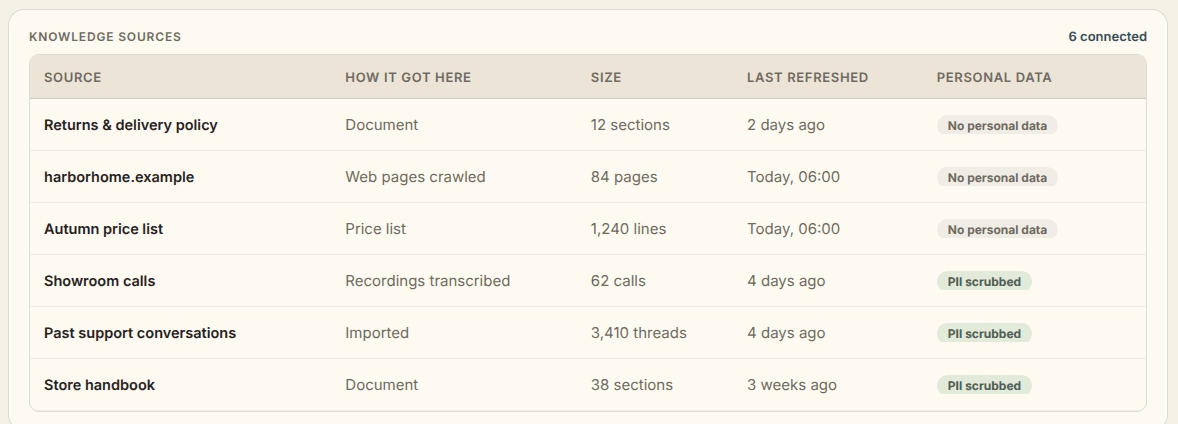
The knowledge sources table in the Vavus Concierge console: a returns policy document, crawled web pages, a price list, transcribed showroom calls, imported past support conversations, and a store handbook, each marked no personal data or PII scrubbed.
Personal details are stripped out before anything is indexed. Sample workspace shown.

Everywhere they ask

One agent. Every channel.

The same knowledge, the same rules, and the same transcript, whether the customer typed it on your site, said it on the phone, or sent it at midnight.

Your website

One script tag on the page. Visitors can type, or start a voice call in the browser — no phone number involved on either side.

A page of its own

Every agent gets a hosted page you can share as a link or print as a code. Useful before you have a site, and after.

Your phone number

Point your main line at the agent through your own telephony provider. It answers, and rings your desk when it should.

Business messaging

The business messaging apps your customers already have open, plus text messages, on accounts you own.

Email

It reads the inbox and replies from the same knowledge, in the same voice as the chat.

Your own software

A REST API, signed webhooks, and SDKs, so the agent can answer inside a product you already built.

The phone line and the messaging channels run on accounts you own. You connect them; we do not resell them to you.

Mid-conversation

It does things, not just says things.

An answer that ends in “you will have to call back” is not an answer. Connect your tools once, and the agent can finish what the customer came for.

Looks up an order

It reads the systems you connect while the customer is still in the conversation, instead of promising that someone will check.

Books the slot

It takes the booking during the conversation, in the calendar you connect.

Sends a payment link

When the conversation ends in a purchase, it hands over a link to pay through the payment tools you connect.

Takes the message

Out of hours, or when nothing covers the question, it writes down what they wanted and who should call back.

Every action is limited to the tools you connect and the permissions you give them.

Escalation

A person takes over the moment they should.

Every agent has a line it will not cross, and you draw it. When the conversation reaches that line it hands over — by your rules, not by its mood.

  • They ask for a person.
  • They ask the same thing twice.
  • They raise something your sources do not cover.
  • It is outside your hours.

Live takeover

Someone on your team steps into the running conversation from the console. The customer keeps typing into the same window and never repeats themselves.

Warm transfer

On a call, it passes the customer across with what it has already gathered, so the person picking up starts halfway through, not at the beginning.

Message taken

When nobody is free, it writes down what they wanted, who they are, and how to reach them, and drops it where your team already looks.

Getting started

Set it up by answering questions.

There is no blank configuration file waiting for you. The guided interview writes it, and you read it back before a single customer does.

  1. 01

    Answer the interview

    It asks what your business does, who calls you, and what the agent may and may not say. Your answers become the configuration.

  2. 02

    Load what it may know

    Documents, your website, the price list, recordings, past support threads. Refreshed on the schedule you choose.

  3. 03

    Read the first version

    Test conversations are scored before anything is live, and a person has to approve it. Nothing goes out on your name unread.

  4. 04

    Point a channel at it

    Paste one script tag, share the hosted page, or send your phone line to it. Add the rest whenever you like.

Languages

Speaks your customers’ languages, and switches mid-call.

The agent works in 80 languages: its greeting, its prompts, its buttons, and the lines it says out loud. You pick the one it opens in, and offer as many of the others as you like.

A customer who starts in one language and continues in another is followed inside the same conversation. No restart, no second number to call, no “press 2”.

We built the translation platform this runs on. Language is not something we bolted onto a support tool — it is the thing we do.

Eight written by hand, 72 more translated

  • English

    English

  • Español

    Spanish

  • Français

    French

  • Deutsch

    German

  • Italiano

    Italian

  • Português

    Portuguese

  • Română

    Romanian

  • العربية

    Arabic

Insights

The report that pays for the agent.

Every conversation becomes a line you can read. Not a dashboard to admire — a short list of things to go and fix this week.

The questions you get asked most
Ranked, in your customers’ words rather than yours.
The questions nothing answers
Every one of them is a paragraph away from being answered forever.
The hours you are busiest
By hour, so you can see when nobody was there to pick up.
The requests to buy or book that went unserved
People who wanted to spend money and did not get an answer.
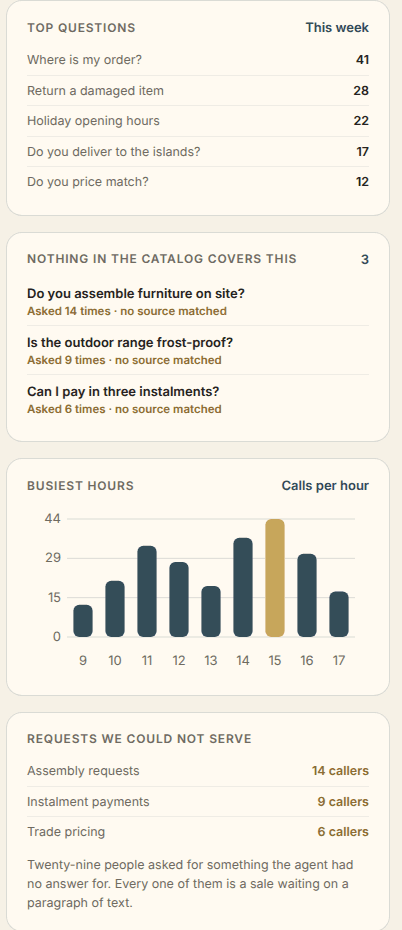
The insights column in the Vavus Concierge console: top questions this week, questions nothing in the knowledge covers, busiest hours by call volume, and the requests the agent could not serve.
Sample workspace shown.

The desk

Listen to any call. Live or after.

An agent you cannot hear is an agent you cannot trust. So the console is built around hearing it — while it is speaking, and long afterward.

Listen while it happens

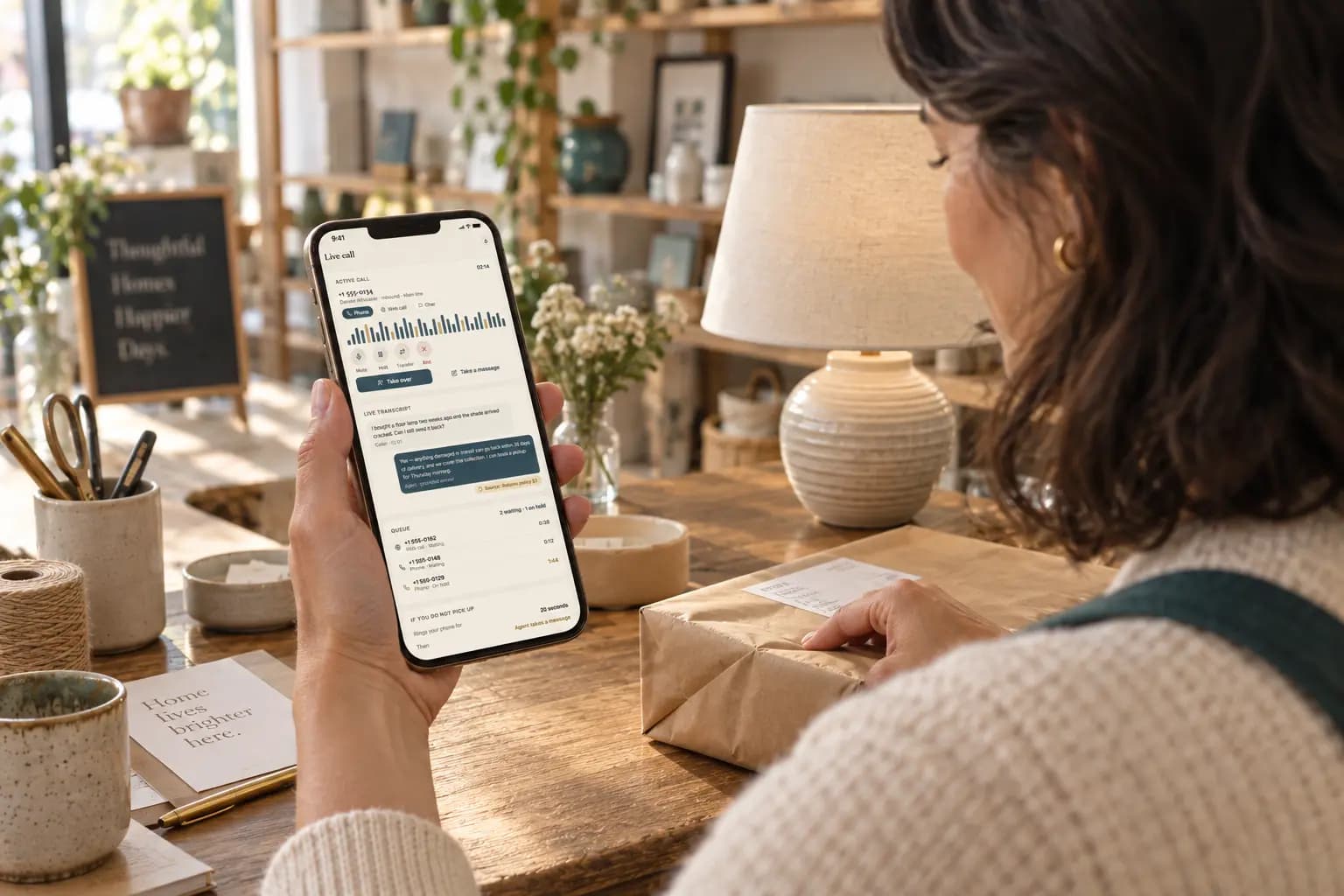
The live desk shows every conversation in progress. You can listen in on a call without interrupting it, and step in if you want to.

Read it afterward

Full transcripts, searchable, with the source behind each answer.

Play the recording

Recording is a setting you turn on, and the caller hears the notice before it starts.

See what it cost

Every conversation is scored for quality and metered on the same Vavus token ledger as the rest of your account.

Trust and control

Yours, and only yours.

Six things we can show you the mechanism for. There is no badge wall here, because a badge is not a mechanism.

Your workspace is yours
Your knowledge, your conversations and your recordings live in your own workspace. No other business’s agent can read them.
Personal details stripped before indexing
Names, numbers and card fragments are removed from recordings and imported conversations before anything becomes searchable.
A signed BAA for healthcare
Delivery scoped for HIPAA, under the same agreement the rest of the Vavus platform runs on.
No conversation content in logs
Diagnostics record that something happened, never what was said.
US primary, European and Asian edges
The same infrastructure the rest of Vavus runs on. Where your data is processed is written into your agreement.
Built on an encrypted platform
The same platform whose translation, history and messaging are encrypted on the device before they ever reach us.

Questions

What people ask before they buy.

없는 내용을 지어내지는 않나요?+

그렇지 않습니다. Vavus Concierge는 등록하신 자료에서만 답합니다. 문서, 웹 페이지, 가격표, 녹음된 통화, 지난 상담 기록이 그 자료이며 그 밖의 것은 쓰지 않습니다. 어떤 자료에도 없는 질문에는 규정을 지어내는 대신 모른다고 말하고 메시지를 대신 받아 둡니다. 이후 대화를 열어 각 답변이 어느 자료에서 나왔는지 확인하실 수 있습니다.

응대할 수 없을 때는 어떻게 되나요?+

사람에게 넘깁니다. 고객이 담당자를 찾으면 상담원은 즉시 응대를 멈춥니다. 같은 질문이 두 번 나오거나 자료가 다루지 않는 사안이 나오면, 설정하신 규칙에 따라 상위로 넘어갑니다. 팀원이 콘솔에서 진행 중인 대화를 이어받을 수도 있고, 상담원이 고객의 용건과 연락 방법을 메시지로 받아 둘 수도 있습니다.

설정에는 얼마나 걸리며, 개발자가 필요한가요?+

웹사이트 위젯에는 개발자가 필요 없습니다. 스크립트 태그 하나면 되고, 사업에 관한 질문에 답하시면 안내형 문답이 설정을 대신 작성합니다. 개발자는 대화 도중 상담원이 회사 시스템을 조회하도록 하려는 경우에만 필요하며, 여기에는 REST API, 서명된 웹훅, SDK를 사용합니다. 담당자가 첫 번째 버전을 읽고 승인하기 전에는 아무것도 공개되지 않습니다.

제 데이터는 어디로 가나요?+

회사 전용 작업 공간에 저장되며, 다른 사업체의 상담원은 이를 읽을 수 없습니다. 이름, 번호, 카드 일부 숫자는 녹음과 가져온 대화에서 제거된 뒤에야 색인되고, 진단 기록에는 대화 내용이 담기지 않습니다. 의료 분야 도입은 서명된 BAA 아래에서 운영되며, 처리 지역은 계약서에 명시됩니다.

결제를 받을 수 있나요?+

연결하신 결제 도구를 통해 대화 중에 결제 링크를 보낼 수 있고, 같은 방식으로 주문을 조회하거나 예약 시간을 잡을 수도 있습니다. 모든 동작은 연결한 도구와 그 도구에 부여한 권한의 범위 안에서만 이루어집니다.

어떤 언어를 할 수 있나요?+

상담원의 인사말, 안내 문구, 버튼, 음성 문장은 여덟 개 언어로 제공됩니다. 영어, 스페인어, 프랑스어, 독일어, 포르투갈어, 루마니아어, 이탈리아어, 아랍어입니다. 도중에 언어를 바꾼 고객도 같은 대화 안에서 그대로 이어지며 다시 시작할 필요가 없습니다. Vavus는 번역 회사이므로 이 부분을 가장 오래 만들어 왔습니다.

통화를 들을 수 있나요?+

예. 실시간 화면에서 대화가 오가는 모습을 그대로 볼 수 있고, 통화가 진행되는 동안 들을 수도 있습니다. 통화가 끝나면 각 답변의 근거 자료가 표시된 전체 기록과 품질 점수가 남고, 발신자에게 안내를 들려주고 녹음을 켜 두신 경우에는 녹음 파일도 남습니다.

요금은 어떻게 책정되나요?+

상담원 단위 월 요금이며, 모든 대화는 계정의 다른 기능과 동일한 Vavus 토큰 원장으로 계량됩니다. 금액은 제품이 베타를 마칠 때 공개하며, 그전까지는 콘솔에서 상담원을 설정하시면 비용을 알려 드립니다. “Powered by Vavus AI” 표시는 월 정액 부가 상품으로 제거할 수 있습니다.

무료 체험이 있나요?+

없습니다. 이 페이지의 상담원은 저희가 실제로 운영 중인 상담원입니다. 저희와 이야기하기 전에 무엇이든 물어보십시오.

Ask ours what it doesn’t know.

It will tell you. Then set up one of your own, load what it may know, and read the first version before anybody else does.

No form first. The agent on this page is the product.