Nakakatipid ng oras ang mga app sa pagdidikta at pagsasalin kapag inaalis nila ang mabagal na bahagi sa paligid ng mismong mga salita: paglipat ng app, pagkopya ng teksto, pag-paste ng output, muling pag-check ng pares ng wika, at mano-manong pag-type ng mahahabang sagot. Sa mga paulit-ulit na workflow, makakatipid ang Vavus Keyboard ng oras nang hanggang 4x kumpara sa lumang paulit-ulit na copy-paste. Nakadepende sa gawain ang eksaktong pakinabang, pero pare-pareho ang pattern: mas kaunting hakbang, mas mabilis na trabaho.
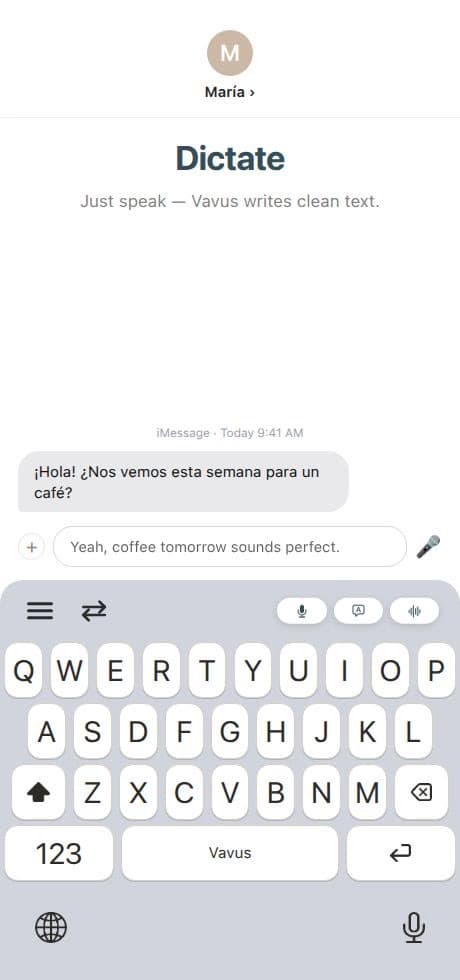
Ang pinakamalaking pagbuti ay nanggagaling sa paglalagay ng pagdidikta at pagsasalin kung saan nagsusulat na ang user. Sa desktop, ibig sabihin nito ay mga hotkey para sa pagdidikta, pagsasalin, at reverse translation. Sa mobile, ibig sabihin nito ay access sa keyboard sa loob ng mga mensahe, email, form, notes, at social app.
Saan nanggagaling ang 4x na natitipid na oras
Ganito kadalasan ang mabagal na workflow: magbukas ng hiwalay na translation app, mag-paste ng teksto, pumili ng mga wika, magsalin, kopyahin ang resulta, bumalik sa orihinal na app, mag-paste, saka mag-edit. Kung nagta-type din ang user ng mahabang sagot, lalo pang humahaba ang antala.
Direkta ang mas mabilis na workflow:
-Magdikta sa halip na mag-type: Sabihin ang unang draft sa aktibong text field.
-Magsalin sa mismong lugar: Ibalik ang isinaling resulta sa app kung saan nangyayari ang trabaho.
-Mag-reverse translate: Magsulat sa wikang natural sa iyo, saka gawin ang bersyon sa target na wika.
-Gamitin muli ang history: Panatilihing malapit sa account ang mga karaniwang parirala, mga naunang salin, at mga napiling wika.
-Manatili sa gawain: Iwasang magbukas ng hiwalay na browser tab o window ng translator para sa bawat pangungusap.
Kaya puwedeng malaki ang natitipid. Mahalaga ang engine sa pagsasalin, pero kasinghalaga nito ang workflow sa paligid nito.
Desktop: mas mabuti ang hotkey kaysa sa palipat-lipat
Kadalasang nagtatrabaho ang mga user sa desktop sa loob ng mga dokumento, support queue, CRM, spreadsheet, intake form, at email. Nakakaabala sa daloy ang hiwalay na window ng translator. Pinapanatili ng Vavus Keyboard sa desktop na malapit sa aktibong app ang layer ng wika gamit ang mga hotkey.
Nakakatulong ang pagdidikta kapag kailangang magsulat ng user ng mas mahabang tala, buod, sagot, o entry sa field. Nakakatulong ang pagsasalin kapag kailangang mabilis na maging ibang wika ang napiling teksto. Nakakatulong ang reverse translation kapag gustong mag-isip ng user sa pinakamalakas niyang wika at magpadala sa wikang inaasahan ng tatanggap.
Para sa mga workflow sa support, operations, healthcare admin, sales, at paaralan, mabilis na nadaragdag ang mga segundong iyon dahil paulit-ulit ang parehong pattern buong araw.
Mobile: ang keyboard ang workflow
Sa phone, sa keyboard nangyayari ang karamihan ng trabahong maraming wika. Ang mga mensahe sa biyahe, chat ng pamilya, tagubilin sa delivery, sagot sa customer, tala sa klase, at mabilis na update sa trabaho ay nagsisimulang lahat sa text field.
Kapaki-pakinabang ang translation app sa mobile kapag may oras ang user na buksan ito. Mas mabilis ang keyboard na nagsasalin kapag nasa loob na ng usapan ang user. Puwedeng magdikta ng sagot ang user, isalin ito, at ipadala ito nang hindi umaalis sa thread.
Mahalaga iyan dahil madalas na pira-piraso ang trabaho sa mobile. Ang pinakamahusay na tool sa wika ay ang hindi pumipilit sa user na buuin muli ang konteksto tuwing lilipat siya ng app.
Dapat iisang account ang gamit ng desktop at mobile
Lalong lumalaki ang natitipid na oras kapag konektado ang desktop at mobile. Puwedeng magdikta ang user ng sagot sa support sa desktop sa umaga, magsalin ng mensahe sa mobile sa tanghalian, at repasuhin ang history mamaya mula sa mas malawak na Vavus account.
Nakatuon ang Vavus Keyboard sa mabilis na lugar ng pagsusulat. Idinadagdag ng Vavus AI ang mas malawak na mga workflow ng app: live na pagsasalin, mga dokumento, tawag, mensahe, file, AI chat, at mga tool ng account. Magkasama, ginagawa nilang parang iisang layer ng wika ang pagdidikta at pagsasalin, sa halip na magkakahiwalay na utility.
Isang praktikal na benchmark
Dapat unawain ang claim na hanggang 4x bilang benchmark ng workflow, hindi garantiya para sa bawat pangungusap. Ang pagsasalin ng iisang salita ay maaaring hindi gaanong bumilis. Ang paulit-ulit na gawaing may pag-type, pagkopya, paglipat, at pag-edit ay kadalasang bumibilis.
Dapat sukatin ng mga team ang trabahong talagang ginagawa nila: isang sagot sa support, isang isinaling intake note, isang mensahe sa biyahe, isang update sa CRM, o isang komento sa dokumento. Bilangin ang mga hakbang bago at pagkatapos. Ang pinakamabilis na setup ay kadalasang ang nag-aalis ng pinakamaraming mano-manong galaw sa paligid ng teksto.
FAQ
Lagi bang nakakatipid ng oras ang pagdidikta?
Hindi. Pinakamalaki ang natitipid nito sa mas mahahabang teksto, paulit-ulit na form, mensahe, tala, at unang draft. Ang maiikling label ay maaaring mas mabilis pa ring i-type.
Nagbabago ba ang kalidad ng pagsasalin dahil nasa loob ito ng keyboard?
Binabago ng keyboard kung saan nangyayari ang workflow. Nakadepende pa rin ang kalidad ng pagsasalin sa pares ng wika, konteksto, napiling engine, kalidad ng audio para sa pagdidikta, at pagrepaso para sa nilalamang mataas ang taya.
Bakit gagamitin ang parehong desktop at mobile na app?
Lumilipat ng device ang mga tao. Mas mainam ang mga hotkey sa desktop para sa mahahabang sesyon ng trabaho, habang mas mainam ang access sa keyboard sa mobile sa loob ng mga usapan. Pinapanatiling mas pare-pareho ng iisang Vavus account ang workflow.